• Skip to primary navigation
  • Skip to main content
  • Skip to primary sidebar

SABRINA&COMPANY SOCIAL MARKETING

Social Media Agency

  • All Social
  • Social Packages
  • Services
    • Social Media Packages
    • Consultations Social & Business
    • Community Facebook Manager
  • About
    • Sabrina&Company
    • Happy Clients
    • Meet Sabrina
    • Charity
    • Image Source Front Page
    • Privacy
  • Love Happyness
  • BLOG
  • Contact

Social Media

"It's all social" - Sabrina Espinal

Sabrina’s 5 Creative Business Tips To Do This Weekend

By Sabrina Espinal 12:26 pm

Creative people that own a business are often flooded with lots of ideas and plans of what they want to implement for their business, website, and marketing. Sometimes when you have so many great ideas you can get so overwhelmed that you end up doing nothing! But I have put together 5 tips of what you can do to move forward.

5 things to do for you and your business

Be You
Comparision is the thief of joy!  Get confident in defining your own unique business. Whatever you are doing with your creative business, be you. Certainly, you will look at others in your field but when the dust settles, make it your own style and flavor.

Revisit Your Ideal Client and Your Ideal Business
I challenge people to rethink their “ideal client” because their ideal client profile may actually be too narrow in scope.

Do A Small Blog Post
I don’t mean start a blog post and then get distracted and save it in drafts! Take an hour and do a blog post about one the things on your big ideas list.

Take care of the little things in your post:

  • Name your image the same as your blog post title for SEO
  • Assign a category to your blog post
  • Add relevant categories to your post
  • Share your post on your social networks

Sign Up For RecurPost To Handle Basic Social Posting
First, I am not a fan of “set it and forget it” social posting because that is not what social media is about. But, if you want your voice to be heard on a daily basis this is a great option when you are busy.

How To Use RecurPost:  

This social media scheduling tool is free for up to three accounts. I recommend setting up Twitter, your Facebook Page, and LinkedIn as your three social media accounts.  Then load RecurPost with 14-21 snips of your content, your thoughts, pieces of your blog posts, snips of your business and then set it to post daily. You can set the content to expire at a certain date and then go back and reload. Don’t worry, it will save all of your expired content for later use!  Check out Recurpost.

Build Relationships
Reach out to an old friend to see how they are doing. Send a real Hallmark card to a family member.  Touch base with someone in your field and find out if there is a good upcoming conference or workshop coming up.

Join Me On Instagram

Make An Impression

Sabrina Espinal
Sabrina&Company

Image Credit © elisall Twenty20

 

Make A Date With Your Website

By Sabrina Espinal 5:08 pm

Hello there!

This is the 2nd in my series of Make A Date With… And this edition is Make A Date With Your Website. Grab a cup of tea, put on your favorite music, grab a notepad and start your date!

  • Check the copyright date on your website and make sure it’s up to date. If it’s not, have your website person code your © 2026 and it will auto-update each year.
  • Install the Grammarly on your desktop or Chrome Browser.  Grammarly is a grammar checker that instantly eliminates grammatical errors and enhances your writing. “Grammarly is trusted by millions every day”. I have it on my Chrome browser and it auto pops into the bottom right-hand corner of my WordPress pages when I’m inside of my site. Grammarly underlines possible grammar issues in red and suggests grammar options.
  • Did you install Grammarly? Ok, now look at a few important pages on your website. Let’s start with your About page.  Check the spelling and grammar with Grammarly.
  • Look at your website on mobile. Take 5-7 minutes and look at as many pages as possible. If you aren’t happy with how it looks.
  • Do you have blog posts on your site? Think about refreshing the images on your existing blog post to give them a fresh look.
  • Try not to upload any images over 900 pixels so it doesn’t slow down your website speed. If your front page calls for larger images, that’s ok.
  • Smush It! Resize, optimize and compress all of your images with the incredibly powerful and 100% free WordPress image smusher, brought to you by the superteam at WPMU DEV!
  • SSL Certificate: Don’t frown, Google loves to see sites that are secure with an SSL certificate. Call your web hosting company and start a conversation and see if it’s the right thing for you.

Join Me On Instagram

Make An Impression

Sabrina Espinal
Sabrina&Company Marketing

Image Credit © Style Stock


How To Post Social Media During A Tragedy

By Sabrina Espinal 12:02 pm

how to post social media during a tragedy

Our world is all to often filled with unexpected local and global tragedies that shock and sadden people. During these times it is normal for social media news streams to be filled with timely details and people’s personal sentiments.

As a social media strategist, I believe that (in most cases) a business shouldn’t “post as usual”. Posting about your sale or program can often make a brand seem heartless or insensitive. Depending on the brand I suggest a mixture of posting options.

Pick and choose posting options right for your brand:

  1. Post an acknowledgment of the tragedy, showing respect, and then post a toned down non-sales message later in the day.
  2. Silence is perfectly fine if a brand doesn’t want to post on the first full day of a tragedy.
  3. “Pause” any auto-posting messages for a day.
  4. Never use the tragedy as part of a post that includes a sales pitch.

The very last thing that a business needs is to have a misstep that will offend people on social media and create a brand nightmare.

Social media is all about community—and in times of tragedy or national distress, the community becomes more important than ever. Internet-goers use social media to reflect, react, and respond to tragedy; and through social media can easily spread hyperbole and inaccuracies, many users rely on its immediacy to share information in those first crucial moments of an unfolding event.

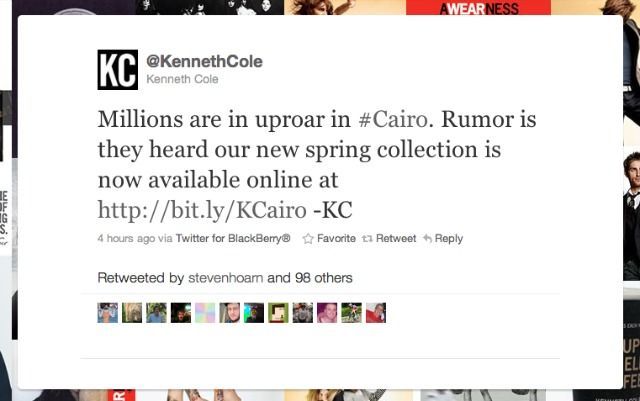
For brands, it can be hard to know just what to say during tragic times; but often, the best thing to say is nothing at all. Instances like Kenneth Cole’s #Cairo Tweet have become synonymous with the sort of social media disasters that no corporate PR team wants to clean up; but nearly every instance of a big brand blunder can be avoided by prioritizing real, human grief over absolutely any other agenda (An apology was later posted).  Basic sensitivity in times of national distress is key—and for companies who misstep, a timely and sincere apology is critical.

http-%2F%2Fmashable.com%2Fwp-content%2Fuploads%2F2011%2F02%2Fcole

The anniversary of September 11 is still as somber an occasion as ever, as Americans come together to pay tribute to those who lost their lives that tragic day—and unsurprisingly, most prefer to grieve without the input of brands. Though many brands were publicly shamed for tasteless tributes, AT&T stunned with a blatant advertisement:


The company’s “Never Forget” sentiment was met with a chorus of anger, shock, and disappointment due to the brand’s exploitative imagery. Though the tweet was quickly deleted, screenshots soon circulated on major news outlets as users awaited an apology from AT&T’s corporate Twitter account.  An apology did soon follow, but many found the apology to be just as offensive as the original image:


If your brand falters, a sincere apology is always advisable—but sincerity is especially crucial in times of distress. Social media is fleeting, but something as insignificant as a tweet can have a critical impact on a brand’s reputation if it demonstrates an insensitivity to tragic events.

When posting during times of tragedy, use discretion; remember that silence is always a safe strategy. If your company would like to commemorate occasions like September 11, stick to short, simple tributes, and never exploit the day with any attempt to push a product. And if a new tragedy is unfolding, please—unless you can provide clarity or comfort, cancel any scheduled posts and stay quiet.

Resource: Fluency Media.

What do you think? Join the discussion on Facebook

Make An Impression.

Sabrina Espinal
Sabrina&Company Marketing

Make A Date With Your Business

By Sabrina Espinal 10:00 am

Once a month, I want you to make a date with your business.

It’s so easy for single entrepreneurs to do the work for others and forget that they need to take care of how they look on the web.  Your brand and it’s physical appearance can bring in new customers or send them away.

Here are 3 topics to consider on your date:

Are Still Friends With Your Business?

Grab your journal and answer these questions:

  1. What does your audience need and want?
  2. What do you provide?
  3. What do you give to your audience that adds value?
  4. What does your company give back to the world?
  5. Do you still like your brand/company?

How Do I Look?

Put a little polish on how you look to your audience and clients.

  1. Write a new blog post that gives something of value to your audience.
  2. Make notes to freshen just a few things on your website.
  3. Write and mail a personal note card to a client who had a recent success.
  4. Look at your site on a desktop computer &  mobile device – make sure it looks good.

Soul Fun!

If you’re not having fun in your business, no one is. Plan a little soul fun!

  1. How can you have fun in your business?
  2. Can you do a giveaway online?
  3. Can you partner with a business for an online event?
  4. What can you do to give a client a little extra love?

One More Thing…

Check your computer and make sure you are working with the latest software and updates on everything from your operating system to your website security. It makes things run so much better!

Let me know how you’re doing on Facebook

Make An Impression.

Sabrina Espinal
Sabrina&Company Marketing


Start Where You Are – How I Started My Business

By Sabrina Espinal 3:36 pm

Elegant young woman looking in her black leather purse

I started my company in 2009 without a name, without business cards, without a website, without a logo, without anything except an idea.  That’s it, just an idea and my laptop. It was a very simple idea…that I could do Twitter for small businesses in my neighborhood.

My First Client

I asked my husband to help me land Mike as my first client. Mike’s an amazing person and a serial entrepreneur. One day, when I was walking with my hubby, I asked him to cross over to Mike’s store and see if he needed help managing his Twitter account. I was nervous and so I waited outside on the corner (chicken).

Soon my husband and Mike emerged from the store and motioned for me to cross the street. OK, this was it. Breathing hard and not knowing what to expect, I crossed the street. Mike said he wanted to hire me and asked me for my business card. Nervously I looked through my purse (faking it) and then I told him that I didn’t have a card with me. Which was “sort of” true because I didn’t have ANY business cards!  I went home that day and came up with the name Sabrina&Company and I ordered simple business cards from VistaPrint.

Luckily, I create websites, so  I ordered my business domain name and put up a site. From there I contacted LegalZoom, opened a bank account, started using FreshBooks for billing…basically I took care of the details after I started. I wouldn’t advise that for everyone but that’s how it worked for me.

Icing On The Cake

My good friend Kirsten had a virtual business and told me to get a Social Media Marketing certification. She also graciously took me under her wing and shared her clients and knowledge with me as I studied and grew my business. And now, 7 years later, I offer a full slate of custom social media packages, websites, consultations, and Desire Map Workshops.

Passion or Need

If you have a passion or a need to get started, don’t let the big stuff weigh you down. The big stuff could stifle your creativity at the very beginning and that would be sad.

It’s Not That Deep

Do you know how many times you will change your website, tweak a logo, redefine your service offering, design new business cards and change your headshot? SO MANY TIMES!!! So, don’t worry about finding the perfect design or picture because it’s all fluid. And that’s the way it should be. Stay open to change.

Start Where You Are

Sometimes taking your time and making a great big beautiful business plan is great.
Sometimes putting it out there on your social networks or a blog is a perfect start.
And sometimes… just starting with an idea, your computer, and no business cards will really work!

What About You?

Where are you starting from and what’s in your heart? I’d love to hear from you!

Join me on Facebook

Make An Impression.

Sabrina Espinal
Sabrina&Company Marketing

Image credit: © leszekglasner

14 Ways To Repurpose Your Content

By Sabrina Espinal 12:10 pm

14 fun ways repurposeYou’ve taken the time to create a treasure chest of great content so don’t share it just once! Practice the art of repurposing your content.

re·pur·pose (verb) = adapt for use in a different purpose.

Why Repurpose Your Content?
To reach a larger audience, a difference audience, and the audience that missed your post the first time around.

Here are 14 easy ways to repurpose your content!

  1. Create multiple Facebook posts from a blog post.
  2. Do a “round up” email marketing letter with snips and links back to several great posts.
  3. Create 10 tweets from one blog post.
  4. Make it visual: Place quotes from your content on images with your logo and share to Instagram.
  5. Republish your content on LinkedIn.
  6. Turn your content into “printables” and share on Pinterest.
  7. Create a “best of” blog posts and feature content that has the same theme.
  8. Update the top portion of an older blog post with latest information on that topic.
  9. Write a guest post reusing your material and remember to link it back to your site.
  10. Repost your content on your social networks on different days and times.
  11. Make a downloadable PDF and use as a free gift for joining your list.
  12. Make a presentation of your content for SlideShare.
  13. Turn your content into a video.
  14. Take your content and turn it into an ebook.

Let me know if you need any help!

Make An Impression
Sabrina Espinal
Sabrina&Company

  • « Go to Previous Page
  • Page 1
  • Interim pages omitted …
  • Page 5
  • Page 6
  • Page 7
  • Page 8
  • Page 9
  • Go to Next Page »

Primary Sidebar

Article Topics

  • All Social Media
  • Branding
  • Business and Marketing Tips
  • Coaching
  • Content Ideas
  • Happy Inspiration
  • Instagram
  • LikeLoveForYourSoul
  • Love Happyness
  • Make A Date Series

© 2026 · Sabrina Espinal · Privacy Cookies Disclosure · Sabrina&Company

We use cookies for analytics. You agree to the use of cookies by continuing on our site or clicking ok. Privacy Policy